Manage user accounts
Every person who logs in to the repository has an account — DSpace calls it an EPerson. This page covers the account-level admin tasks: finding a user, editing their details, resetting a password, and suspending or deleting an account. To control what a user can do (submit, review, administer), see Users & groups.
An account on its own grants nothing
Registration is open — anyone can create an account. A bare account can log in and read, but it cannot submit, review, or administer anything until it is added to the right group. So managing accounts and granting rights are two separate jobs.
Where to find them
All account tools live under Admin sidebar → Access Control → People
(/access-control/epeople). You need administrator access to open it.
Find a user
- Open Access Control → People.
- In Search, choose how to look the person up:
- Metadata — matches name or email fragments (e.g.
guidefinds every account with "guide" in it). - Email (exact) — matches the full email address only.
- Metadata — matches name or email fragments (e.g.
-
Type your term and click Search (or Browse All to list everyone).
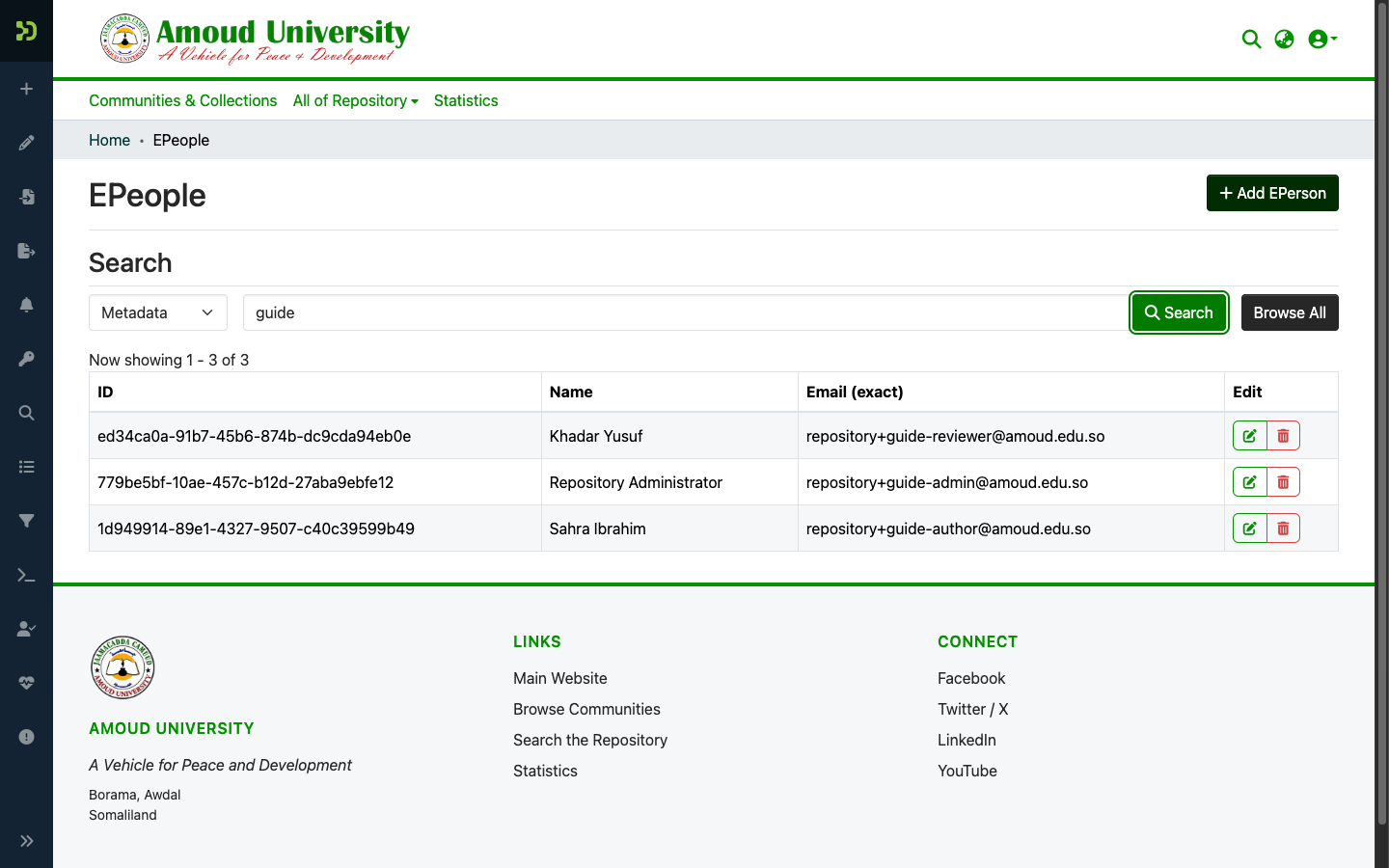
Each row shows the account's ID (its UUID), Name, and Email, with edit (pencil) and delete (bin) buttons on the right. Click the pencil to open the account.
View & edit an account
The Edit EPerson page is where you manage one account.
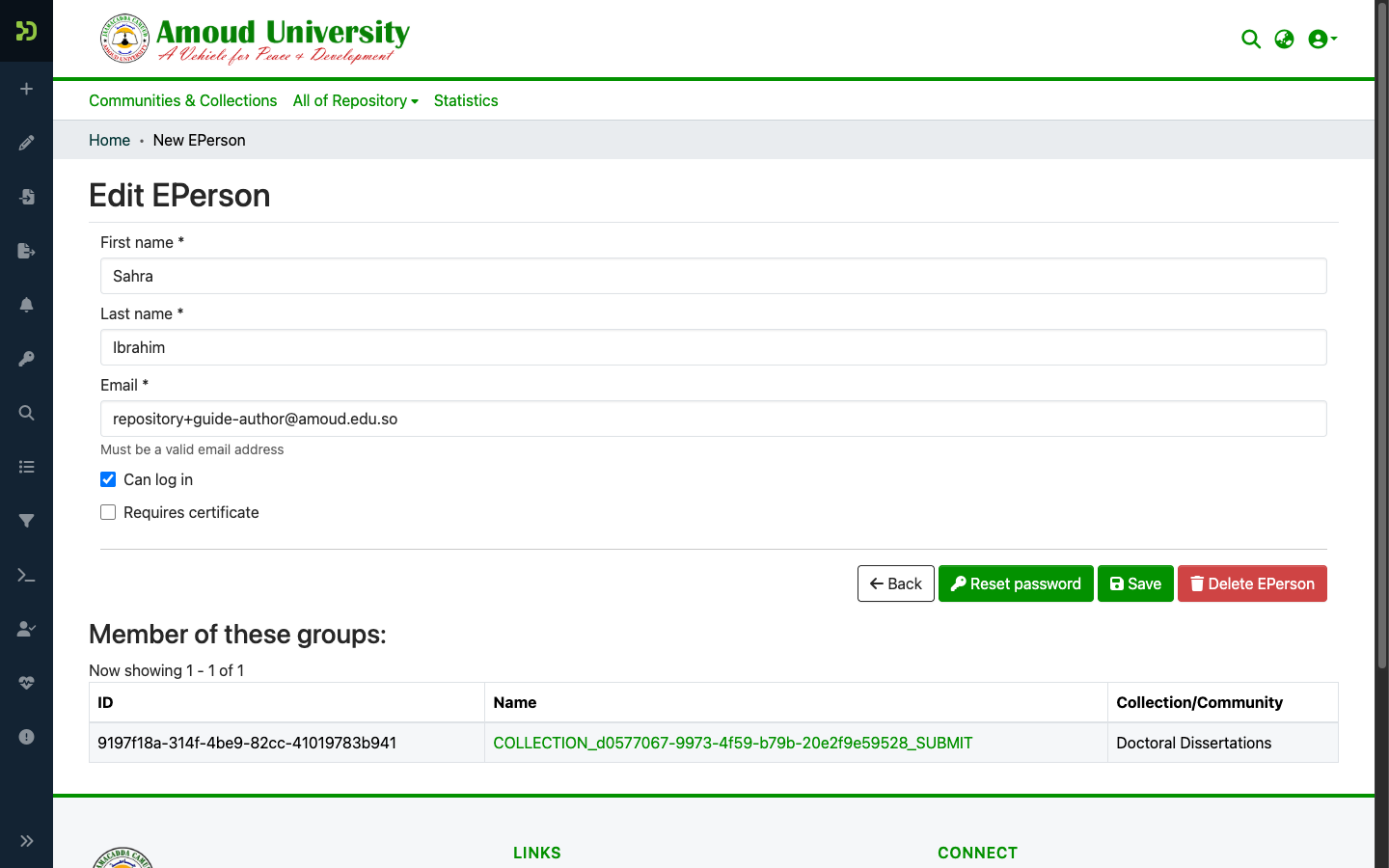
| Field / button | What it does |
|---|---|
| First name / Last name / Email | The person's profile. Edit and Save. |
| Can log in | Tick = the account may sign in. Untick to suspend an account without deleting it. |
| Requires certificate | Leave unticked — AU-IR uses email + password, not client certificates. |
| Reset password | Emails the user a secure link to set a new password. Use this when someone is locked out. |
| Delete EPerson | Permanently removes the account (see the caution below). |
| Member of these groups | Every group the account belongs to — i.e. everything it can do. The Collection/Community column tells you which collection a group grants rights on. |
Suspend instead of delete
To stop someone signing in — for example while a matter is reviewed — untick "Can log in" and Save. This is reversible: re-tick it to restore access. Treat any suspension or removal as a governance action and follow the Amoud ICT Policy (cite the relevant clause in your record).
Deleting an account is not always clean
If a person has submitted or reviewed items, deleting their EPerson can orphan that history. Prefer suspending (untick "Can log in") unless you are sure the account has no footprint — for example a throwaway or duplicate registration. When in doubt, suspend and ask before deleting.
Add an account manually
Users normally register themselves, so you rarely create accounts by hand. When you need to (e.g. a service account), use + Add EPerson on the People page, fill in the name and email, and Save; then use Reset password to send them a set-password link.
Use service emails for shared accounts
Any non-personal account (a directory listing, an uploader for the pilot) should use a
role-based email — repository@, ric@, ictunit@ — never a personal address, so
it survives staff changes.
Next steps
- Users & groups — grant submit / review / admin rights
- Collections & communities