Cite & export
Every item gives you a ready-to-use citation and export options, so you don't have to type reference details by hand.
Copy a citation
-
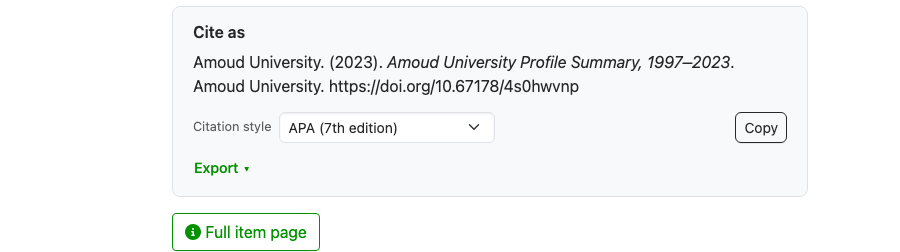
Open the item page and find the Cite as panel.
-
Choose a Citation style if you need one other than the default (APA 7th).
- Click Copy to copy the formatted citation.
Always cite the DOI
When an item has a DOI, cite the DOI link — it's the official, permanent reference and the one indexes recognise. See DOIs & ARKs explained.
Export the reference
Click Export in the Cite-as panel to download the item's details in a standard format:
- RIS — import into reference managers such as Zotero, Mendeley, or EndNote.
- CSV, JSON, XML, and DataCite — for data and metadata use.
Save the file, then import it into your reference manager to add the item to your library.