Create an account
You only need an account if you intend to submit work, review submissions, or administer the repository. Reading and downloading need no account.
Creating an account is free and takes a couple of minutes.
Before you begin
- Use your Amoud University email where possible.
- Have your inbox open — you'll need to confirm your email address.
Steps
- Go to repository.amoud.edu.so.
- Click Log In (top-right), then choose New user? Click here to register.
- Enter your email address, tick the box to agree to the Acceptable Use Policy, and complete the "I'm not a robot" check.
-
Click Register.
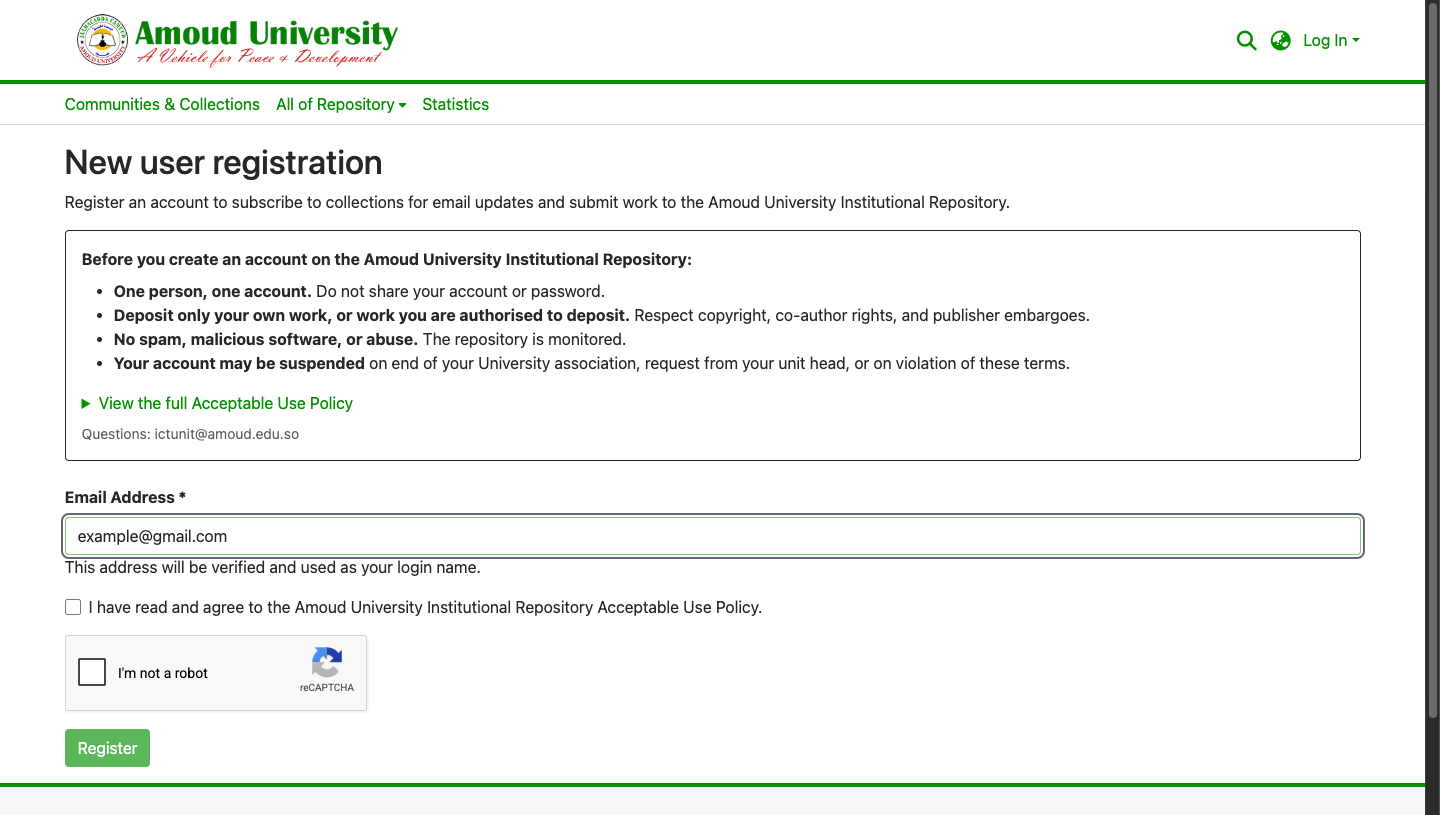
-
Open your inbox and find the email from the repository. Click the verification link inside it.
No email after a few minutes?
Check your spam / junk folder. If it still hasn't arrived, see Common errors.
-
On the page that opens, fill in your first name, last name, optional contact details, and choose a password.
Password rules
Your password must meet the repository's minimum strength (length and a mix of character types). The form tells you if it isn't strong enough yet.
-
Read and accept the Acceptable Use Policy, then click Complete Registration.
You're now registered and logged in.
What you can (and can't) do yet
A brand-new account can read everything and manage its own profile — but it cannot submit until the RIC grants submission rights. If you need to deposit work, see Before you start.